Are you tired of spending hours crafting the perfect email? Look no further! With this amazing
Chrome extension
, you can
access
a wide variety of pre-designed email templates and customize them to suit your needs. Whether you're a business owner, a marketer, or an individual looking to streamline your email communication, this extension is a game-changer.
Save Time and Effort with Pre-Designed Email Templates
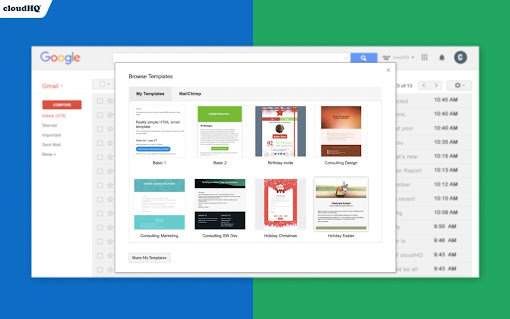
One of the biggest advantages of this extension is its extensive library of pre-designed email templates. Whether you need a newsletter, a discount sales email, party invitations, congratulations messages, holiday greetings, or event emails, you'll find the perfect template to suit your needs. No need to start from scratch - simply choose a template, personalize it, and you're ready to go!
Create Your Own Email Designs with Ease
If you're feeling creative, this extension also offers an intuitive email design creator. With this feature, you can unleash your inner designer and customize your emails to reflect your unique brand. The design creator even comes equipped with a collection of free stock photos to enhance your visual appeal.
Copy and Upload Email Templates for Ultimate Convenience
Want to replicate someone else's email template? With just a click of a button, you can copy any email template from your inbox and make it your own. Additionally, if you already have email templates saved in Mailchimp, you can easily upload them to this extension for seamless integration.
Collaborate and Share Templates with Your Team
Communication is key in any team environment. That's why this extension allows you to share your custom email templates with your team members, ensuring consistency and efficiency in your communication. Say goodbye to tedious back-and-forth editing - with this extension, everyone can access and use the same templates, making collaboration a breeze.
Access and Send Templates on the Go
Don't let being away from your computer hinder your email productivity. This extension offers a mobile add-on, allowing you to access and send your email templates directly from your mobile phone. Whether you're traveling, attending meetings, or simply prefer working on the go, this feature ensures that you can send professional emails anytime, anywhere.
Perfect for Various Email Purposes
Whether you're sending newsletters to your subscribers, announcing exciting discount sales, inviting friends to parties, congratulating colleagues on their achievements, sending holiday greetings to loved ones, or reminding clients to pay their bills - this extension has got you covered. With a wide range of templates for different purposes, you can effortlessly create impactful and visually appealing emails.
Seamless Integration with Gmail
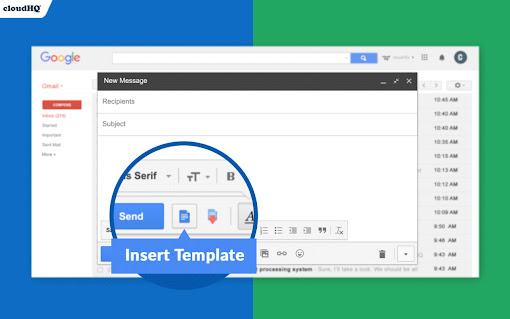
Integration with Gmail is seamless with this extension. Simply open a template directly in your Gmail email compose window, personalize it, and send it out like any other email. No need to switch between applications or platforms - everything can be done within Gmail itself.
Access the Expansive Email Templates Library
Best of all, this extension offers a vast email templates library that is free to use. The library is constantly updated with new templates, providing you with fresh options for your email communication needs. Whether you're looking for professional designs, creative layouts, or industry-specific templates, you'll find them all in the library.
Ready to take your email communication to the next level? Install this Chrome extension today and experience the power of beautiful, efficient, and personalized email templates.
If you're a designer and would like to showcase your email templates, we'd love to hear from you! Contact us at [email protected] and include "Influencer Program" in the subject line.












20 Reviews For This Extension
I love using the easy to use email template.
Amazing extension, I have managed to create several templates that I use all the time, I am so glad I found this. However Recently, the native social media icons in the email footer stopped rendering correctly. They show as broken image placeholders with alt text (e.g. “Instagram icon”, “TikTok icon”, “Pinterest icon”, etc.) instead of icons, and the footer layout is misaligned.
Template sharing is something quite useful. Sadly that is not free but they gave us non-profit discount.
Free version of this extension won't let you load the template you have created. I don't believe developers are being upfront about this fact. Creating a template in their visual designer has weird limitations, like not allowing a table inside a table. As far as their free templates, I didn't like a single one (because I thought they were quite unattractive). I also don't think they were created entirely in visual design mode, which caused a problem of not being able edit certain features visually. I ended up creating a template in MS Word and just shoving it into cloudHQ interface. One thing I did like was that they uploaded pasted images to the web in the background to make them accessible in the template.
I had orginally written a one star review because I couldn't get it to work on a tablet and only on a mobile phone. Support finally got back to me and explained that it is not meant to work on tablets...just mobile phones at this time. Really disappointed because it's an awesome extension. All of my employees carry tablets and it would of simplified many of our workflows. Either way it doesn't deserve a bad review because it's wasn't designed for my use case and it really is great software in the never ending search for automating workflows. I have tried all of the very few available gmail template apps on the google play store and they all work as a copy paste text editors....this is the first solution I have come across the directly integrates into the native gmail app and it's super slick....I will be looking at this company's other solutions in the near future.
I have been trying to use many other web & software but those are not satisfactory, This is easy and smooth. Most importantly, I don't have to use any other website to create a template mail...... Now I can create and use it from Gmail.
Asks for all sorts of access including ability to edit and delete all contacts and content from google drive. Even when installed it failed to work aside from one time initially. Seems very buggy and prone to scams.
Email templates for gmail are really helpful. Anyone using ActorDO AI Assistant for gmail? https://actordo.com
Even large-scale email campaigns feel simple with this app.
The customization options let me adapt templates to any situation.
It works, and is programmed like it should, but it's buggy. It can't copy some emails templates as it does images twice and misses CSS elements, especially for zendesk emails. It can only copy basic things, like emails and fonts. Nothing else. Edit: I have found a fix for it, just edit the clone and press Ctrl+A (Selects it all) and Ctrl+C (copies it all) and paste it into another email. Still though, it'd be nice if I didn't have to do that all the time. Thanks for this extension though, really can help. (editing has some invert effect though, not how it actually is)
This extension by cloudHQ is secret weapon for Gmail warriors. Picture this: a smorgasbord of snazzy templates ready for anything – from your "Huge Sale!" screams to "It's Party Time!" blasts, and even those stiff-upper-lip business emails. It's like having your own mini Mailchimp inside Gmail
Crashes Gmail when loading the template selector.
A fantastic tool for anyone using Gmail. It's really easy to create professional-looking email templates, perfect for various occasions. Simple to use and highly effective.
⭐⭐⭐⭐⭐ - A Game Changer for Email Communication! The Email Templates by cloudHQ extension is a must-have for anyone who uses Gmail regularly. It offers a diverse array of beautiful templates that can be used for various purposes, from newsletters and sales discounts to party invitations and professional correspondences. The ability to create custom templates, import from Mailchimp, and share with team members adds incredible value. What's more, the user-friendly interface and the option to access and send templates from mobile devices make it extremely convenient. This extension has significantly improved the efficiency and effectiveness of my email communications!
As a small business owner, I found myself investing in numerous apps to manage my operations. However, these apps were not delivering the results I needed, and the financial strain was taking a toll on my profit and loss statement. It was a frustrating and costly experience, until I discovered CloudHQ. CloudHQ has proven to be the ultimate solution for my business needs. It's a comprehensive platform that offers a suite of applications to streamline data and email management. From tracking emails to syncing data in real-time, printing emails, and integrating with multiple cloud platforms, CloudHQ does it all. The financial impact of switching to Cloud HQ has been significant. By consolidating all these functions into one platform, I've been able to cut down on the costs of multiple subscriptions. This has had a positive effect on my bottom line, reducing expenses and boosting profits. Moreover, the efficiency and effectiveness of CloudHQ have greatly improved my business operations. I no longer have to juggle multiple apps or deal with ineffective tools. Everything I need is in one place, and it works seamlessly. In conclusion, CloudHQ is more than just a tool - it's a game-changer. It's revolutionized the way I manage my business, saving me time, money, and a lot of frustration. In my book, CloudHQ is the real deal. It's not just good, it's the best.
For some reason I can't do anything, when I am going to choose a template my chrome just freeze. Any Idea ???
Why add on every email I sent the following text: Create and share beautiful email templates x???
WHY WILL A PUBLIC EXTENSION KICK ME OUT CAUSE IM FROM NIGERIA ?
With its extensive library of customizable templates, intuitive interface, and years of experience in email automation, Gmail Email Templates is a solid extension that simplifies and streamlines the process of creating professional and effective email communications. 5 stars.